

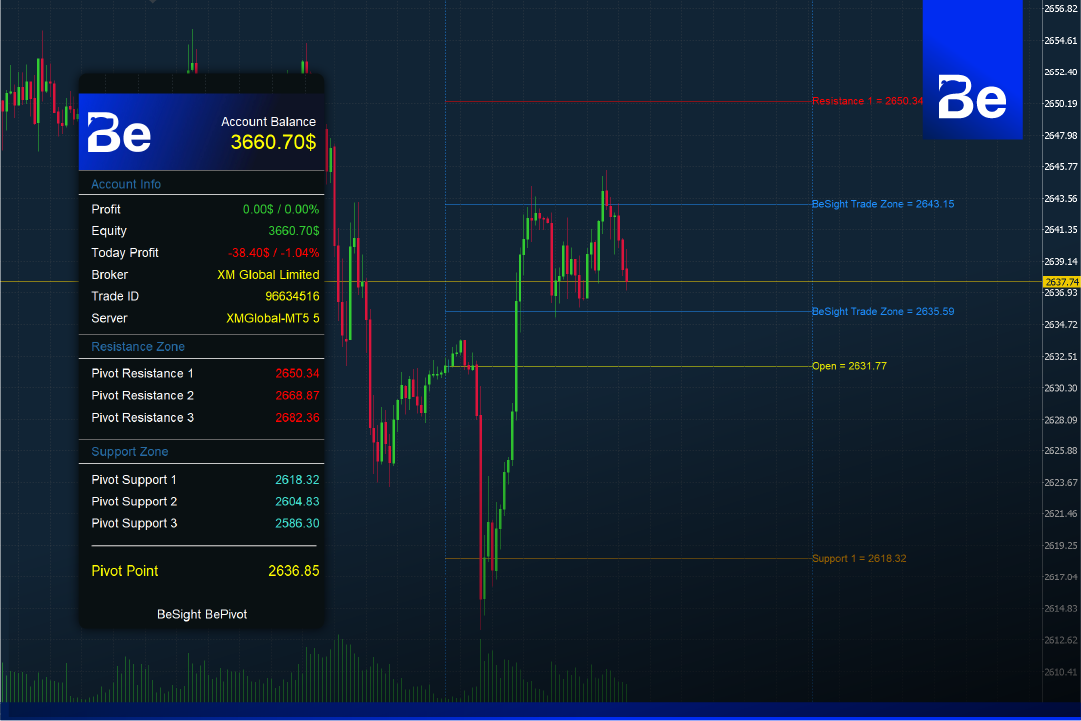
This is great news for all BeSight and ForexRefund members! We now have our first tool, BePivot, which helps identify entry and exit points. This tool is developed by calculating support and resistance levels from the previous day's candlestick chart to find trading zones. These support and resistance zone numbers change daily; as the new day begins, the system automatically recalculates these zones to reflect the current market price.
It will be divided into different zones as follows:
Resistance 1 Resistance level #1 of the day.
Resistance 2 = Second resistance level of the day.
Resistance 3 = Third resistance level of the day.
Open = Today's opening price
Pivot This price is calculated from support and resistance levels and the previous day's closing price.
Support 1 = Support level #1 of the day
Support 2 = Second support level of the day.
Support 3 = Third support level of the day.
by BePivot This would be very useful for gold traders because this tool works well with gold charts.
Download and install BePivot.
- Download BePivot to your computer. Right-click the BePivot file and select Copy File. Open your MT5 program, but you must be logged in to a trading account opened through BeSight or ForexRefund.
- Then go to File > Open Data Folder > MQL5 > Indicators.
- Then right-click, select Paste to paste the BePivot file, and close the window.
- Open the MT5 program, right-click on the Navigator field and press Refresh. The BePivot file will then appear.
- Double-click on BePivot, then check the "Allow" box and click OK to activate it.
Using the BePivot Indicator
It can be used on M1 and M5 timeframes because of its short Stop Loss (SL) and far Take Profit (TP), and it also allows for frequent order entry.
The point where an order can be entered is the Open line or the Pivot line.
Entering orders between the Open and Pivot zones: If the current price chart breaks through today's Open line, we can wait for the price to touch the Open or Pivot line before entering an order.
As for the Resistance and Support zones, they will be used as normal trading zones. When the price moves to these support and resistance points and then reverses, we will enter an order. We will also use Resistance and Support as take-profit points (TP1, TP2, TP3) in case we enter an order in the Open and Pivot zones.
The BePivot indicator is a tool that can be used to find profitable entry points from various support and resistance levels displayed by the system. These support and resistance levels are significant points in the market, suggesting that a price reversal is likely to occur if the price reaches them.
Software details
Developer: BeSight
Distribution: BeSight
File size: 753KB
software: Metatradert 5
Operating system: Windows, Mac OS
safety: Tested.
![Picture of [ADMIN] `SENSEI~](https://besight.net/wp-content/uploads/nsl_avatars/5207db5a26b7923a9ca36d3712820771-150x150.jpg)