BeSight Demand & Supply Zones (MT4)
Be
By BeSight Team
·
เครื่องมือระบุโซนอุปสงค์-อุปทานอัตโนมัติแบบเรียลไทม์บน MT4 ช่วยหาจุดเข้าเทรดและ TP/SL ได้ง่ายในทุก Timeframe
BeSight Demand & Supply Zones (MT4)
BeSight Demand Supply Zones คือเครื่องมือวิเคราะห์กราฟที่ช่วยให้เทรดเดอร์มองเห็น "พื้นที่ที่เจ้าตลาดให้ความสนใจ" ได้อย่างแม่นยำผ่านการระบุโซนอุปสงค์ (Demand) และโซนอุปทาน (Supply) โดยอัตโนมัติ บนโปรแกรม MT4
ดาวน์โหลดและติดตั้ง BeSight Demand & Supply Zone
- กดดาวน์โหลดไฟล์ .ex4 ลงเครื่อง คลิกขวาเลือก Copy ไฟล์ เข้าโปรแกรม MT4 (ต้อง Login ในบัญชีเทรดที่เปิดผ่าน BeSight หรือ ForexRefund เท่านั้น)
- เข้าไปที่ File > Open Data Folder > MQL4 > Indicators
- คลิกขวาเลือก Paste เพื่อวางไฟล์ แล้วปิดหน้าต่างได้เลย
- เข้ามาที่โปรแกรม MT4 คลิกขวาที่ Navigator แล้วกด Refresh ไฟล์จะขึ้นมา
- ดับเบิ้ลคลิกที่ไฟล์ จากนั้นติ๊ก Allow แล้วกด OK เพื่อใช้งานได้เลย
การใช้งาน Indicator BeSight Demand & Supply Zone
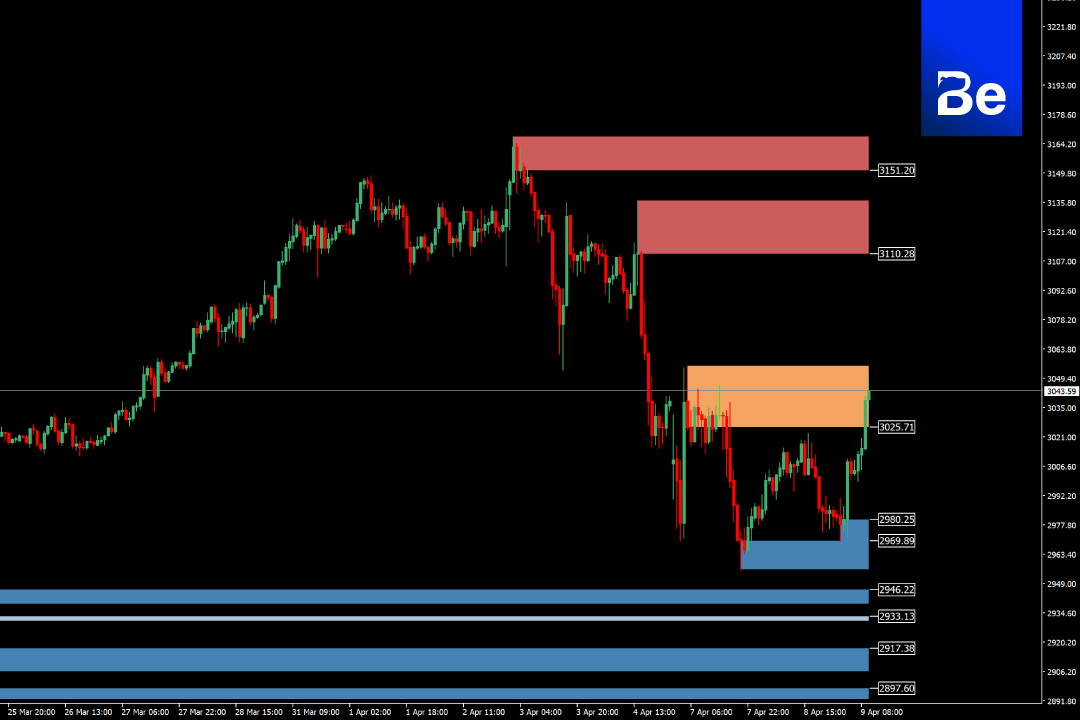
แสดงโซนอัตโนมัติแบบเรียลไทม์ อินดิเคเตอร์จะตรวจจับจุดกลับตัวสำคัญ พร้อมวาด "กล่องสี" บนกราฟเพื่อระบุโซนที่มีโอกาสเกิดแรงซื้อ/ขายในอนาคต
- โซนแดง = Supply Zone (แรงขาย)
- โซนส้ม = Supply Zone ล่าสุด/ใกล้สุด
- โซนน้ำเงิน = Demand Zone (แรงซื้อ)
เหมาะกับทุก Timeframe รองรับทั้ง M1 – D1 สำหรับการวิเคราะห์แบบ Scalping, Day Trade หรือ Swing Trade ช่วยหาจุดเข้าเทรดและ TP/SL โดยใช้โซนเหล่านี้เป็นจุดอ้างอิง
รายละเอียดซอฟต์แวร์
- ผู้พัฒนา: BeSight
- Distribution: BeSight
- ขนาดไฟล์: 96KB
- ซอฟต์แวร์: MetaTrader 4
- ระบบปฏิบัติการ: Windows, Mac OS
- ความปลอดภัย: ทดสอบแล้ว
Original content: besight.net