


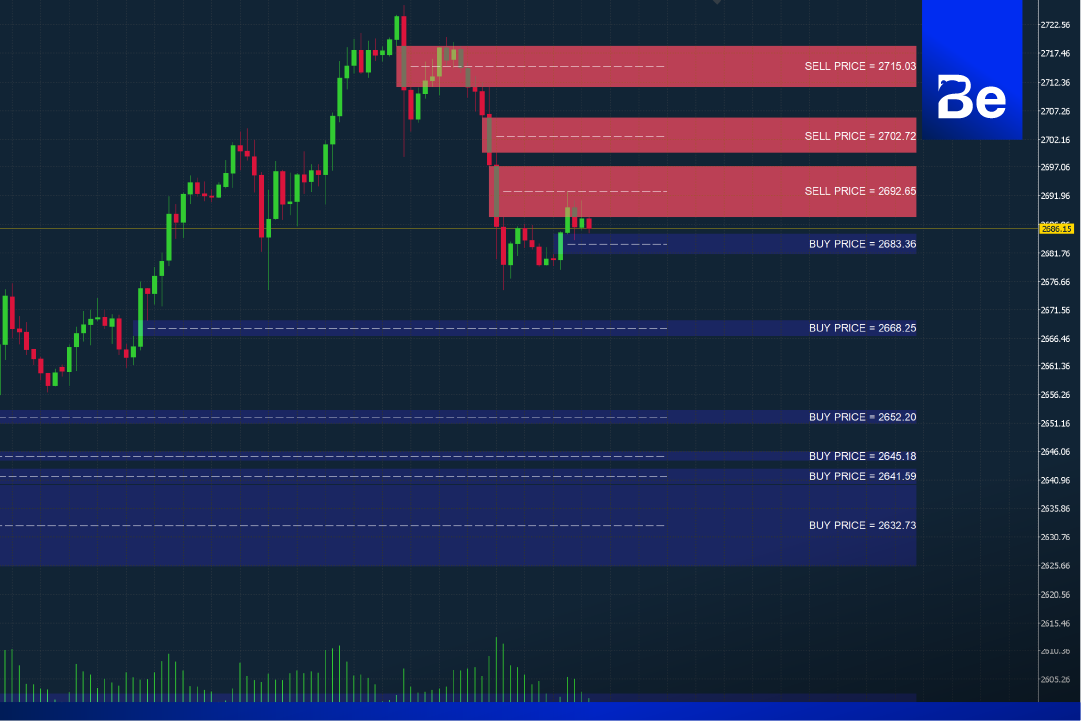
Another tool we offer can help traders easily find entry points using price gaps (FVG) without the need to draw lines manually. This tool is inspired by FVG, or "Fair Value Gap," which is a price gap that often occurs when there is significant buying or selling pressure on the price chart, creating a distance between three candlesticks. When this price gap occurs, investors or traders use it to draw zones similar to important support and resistance levels.
Download and install BeSight FVG.
- Download the BeSight FVG file to your computer. Right-click on the BeSight FVG file and select Copy. Copy the file into your MT5 program. You must be logged in to a trading account opened through BeSight or ForexRefund.
- Then go to File > Open Data Folder > MQL5 > Indicators.
- Then right-click, select Paste to paste the BePivot file, and close the window.
- Open the MT5 program, right-click on the Navigator field and press Refresh. The BeSight FVG file will then appear.
- Double-click on BePivot, then check the "Allow" box and click OK to activate it.
Using the FVG Indicator.
Once an order reaches a certain zone, that point will be used to execute the trade. The tool designed by our team allows traders to find profit-taking points from the FVG (Fair Value) zones. It indicates Buy and Sell points, enabling traders to analyze and make accurate and quick decisions when entering orders.
Software details
Developer: BeSight
Distribution: BeSight
File size: 66KB
software: Metatradert 5
Operating system: Windows, Mac OS
safety: Tested.
![Picture of [ADMIN] `SENSEI~](https://besight.net/wp-content/uploads/nsl_avatars/5207db5a26b7923a9ca36d3712820771-150x150.jpg)